Creating Flashcard Decks
Learn how to create and organize flashcard decks
Last updated 4 months ago
Decks are the folders for your flashcards. Keeping your decks organized is the first step to a stress-free study session. You can organize them by specific chapters, entire courses, or upcoming exams.
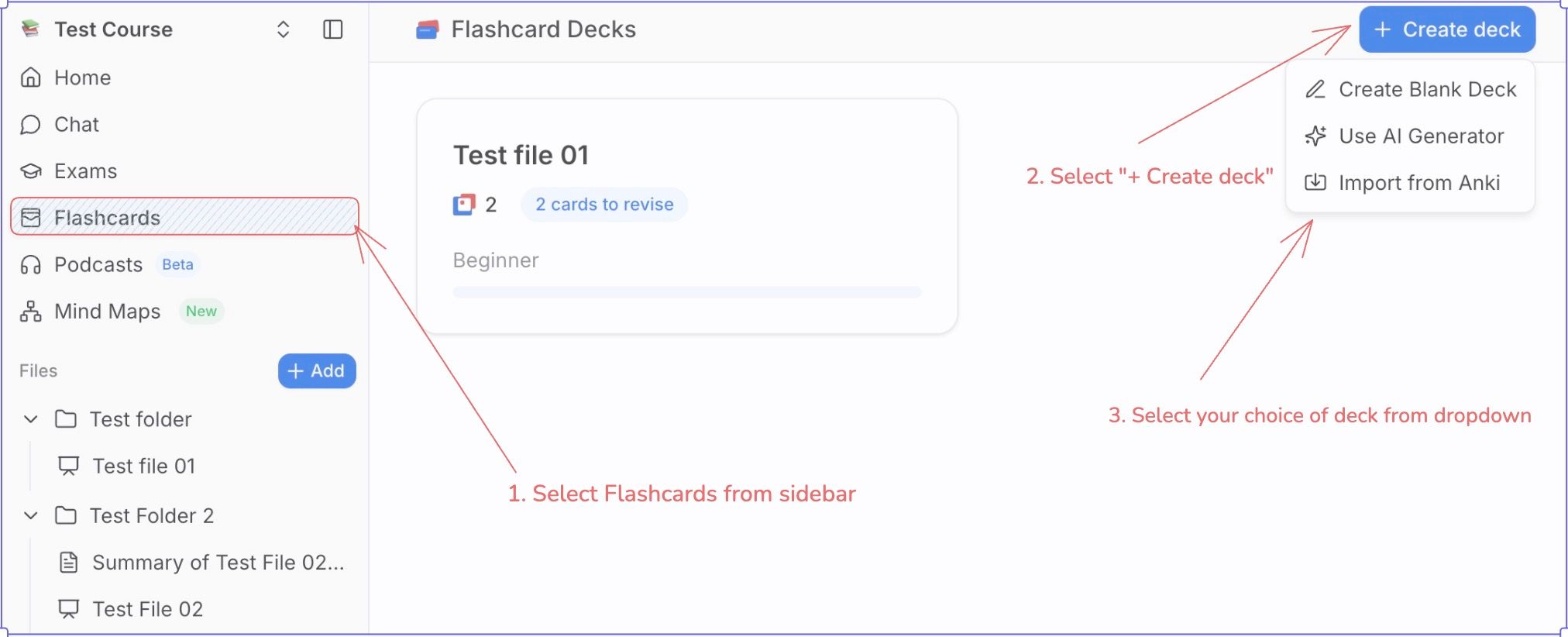
How to Create a New Deck
Navigate to the Flashcards tab in your course sidebar.
Click the + Create Deck button.
Choose one of the below from the dropdown:
Create Blank Deck
Use AI Generator
Import from Anki
Name your deck: Choose a specific name (e.g., "Biology 101 – Cell Structures" rather than just "Bio").
(Optional) Select Images option for including imaged in the flashcards
(Optional) Select Additional options → Difficulty to set the difficulty
Click Save.
Best Practices for Organization
Pro Tip: Avoid making one massive deck for an entire semester. Break them down!
Topic-Based: Create separate decks for major topics (e.g., "Integrals," "Derivatives," "Limits").
Exam-Based: Create a temporary deck named "Final Exam Prep" where you move the most difficult cards from other decks.