AI Generated Flashcards
Learn how to use AI to create flashcards from your course materials
Last updated 4 months ago
Writing flashcards by hand is effective, but time-consuming. acemate allows you to use AI to generate a baseline deck from your existing materials, allowing you to start studying immediately.
Method 1: Generating from Homepage
Ensure your lecture slide or PDF is uploaded and processed in your Library. See Uploading Documents
Click on Flashcards on the sidebar
Click "Generate from lecture"
(Optional) Specify a page range if you only want to study a specific chapter.
(Optional) Set the Difficulty level by clicking on Additional options → Difficulty
(Optional) Provide any additional Instructions if required.
Click on Create deck button.
Method 2: Generating from Documents
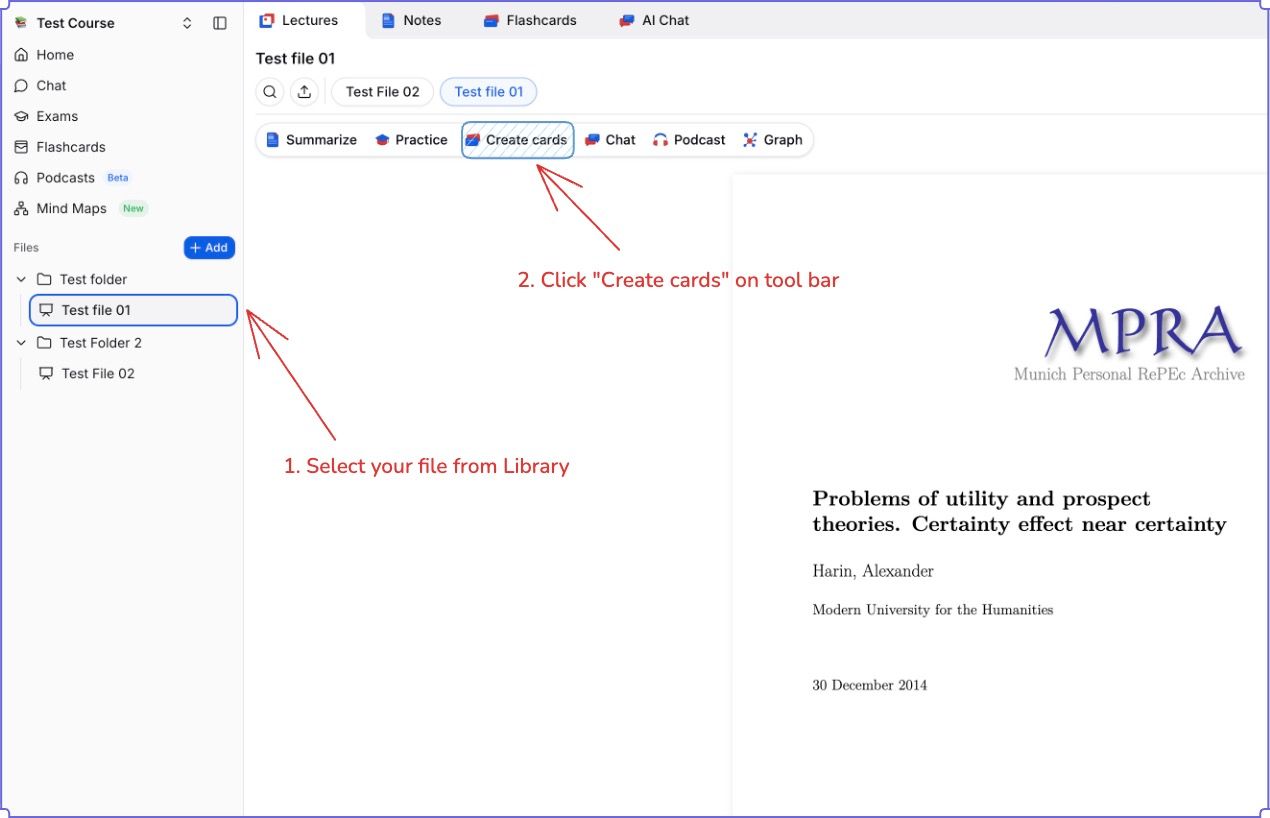
Ensure your lecture slide or PDF is uploaded and processed in your Library.
Open the document from sidebar or use the Quick Actions menu.
Select "Create cards"
(Optional) Specify a page range if you only want to study a specific chapter.
(Optional) Set the Difficulty level by clicking on Additional options → Difficulty
(Optional) Provide any additional Instructions if required.
Click on Create deck button.
Important Tips for AI Cards
Review is Crucial: AI is a tool, not a human tutor. Treat generated cards as "First Drafts."
Edit for Clarity: If a generated answer is too long, shorten it.
Mix and Match: The best decks usually contain 80% AI-generated content (for speed) and 20% manual content (for specific nuances).